---
url: /apps/cfdash/index.md
---
CF Dash
# Your Cloudflare,
Everywhere.
A native iOS and macOS app for managing Cloudflare domains, DNS, Workers,
analytics, security, and WAF — all from your iPhone, iPad, or Mac.
[](https://apps.apple.com/app/cfdash/id6740367143)[Documentation
](/docs/cfdash/)
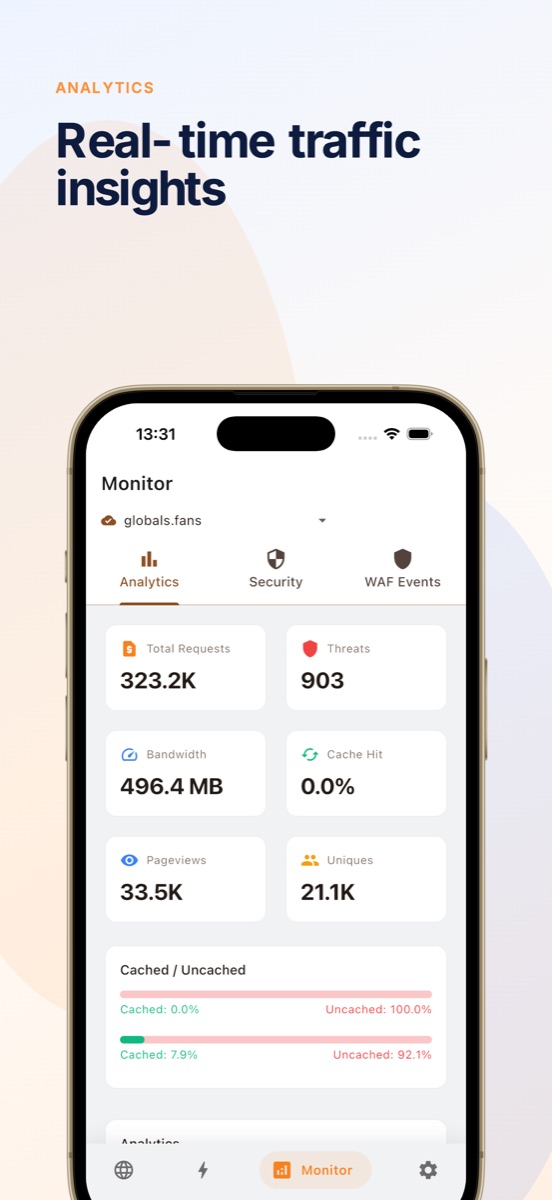

Analytics

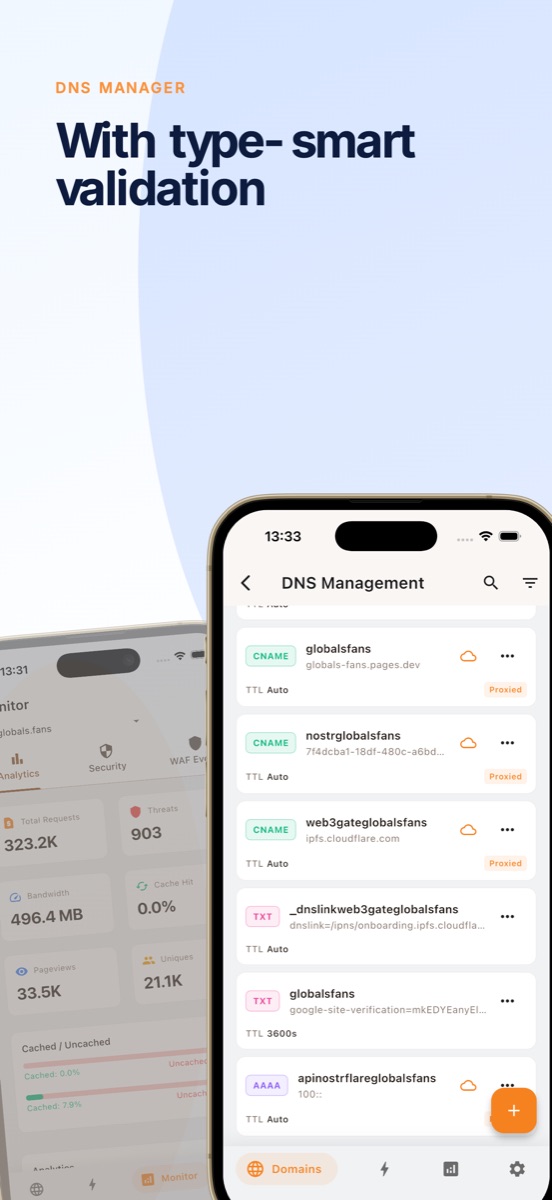
DNS manager
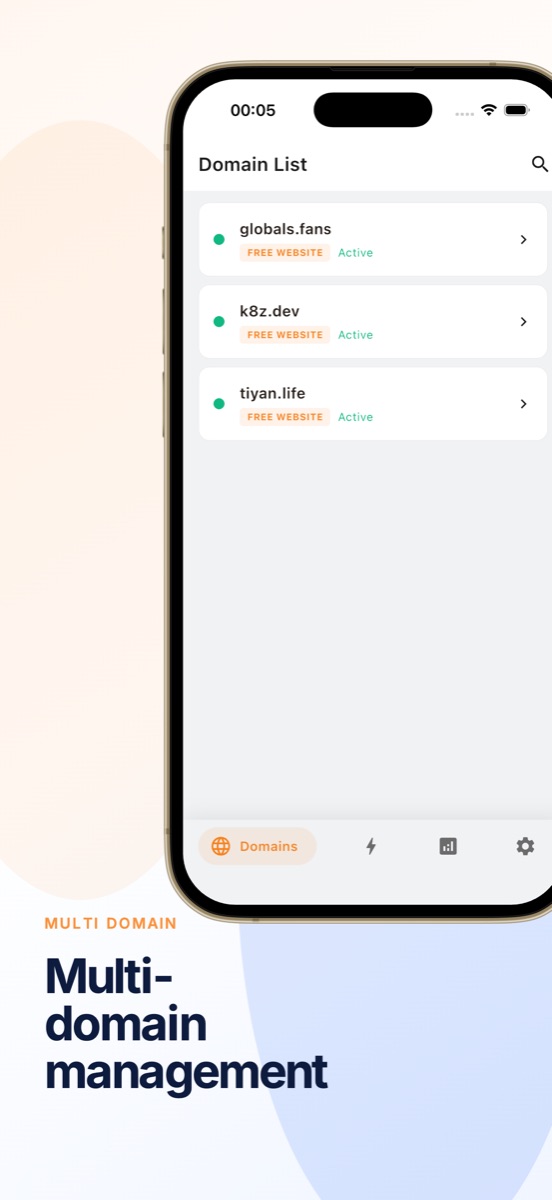
Multi-domain
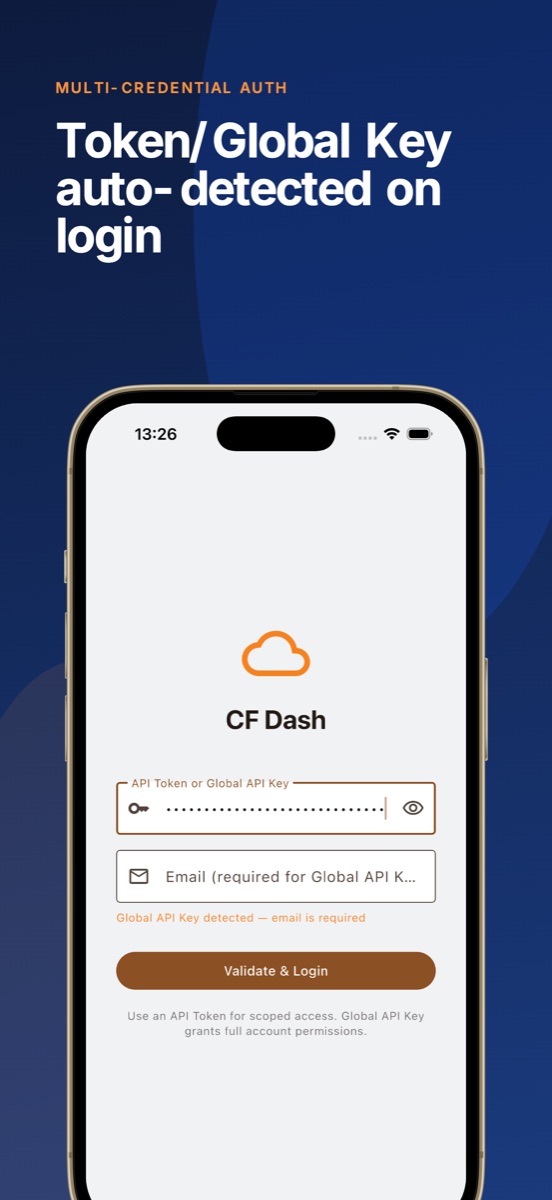
Multi-account
## Sign in without handing over keys
### No API tokens to paste
Sign in with Cloudflare's official OAuth 2.0 + PKCE flow. Scopes are selectable and revocable at any time.
### Tokens live in Keychain
Credentials are stored only in iOS/macOS secure storage. The app never uploads them to any server.
### Device-to-Cloudflare only
Requests go directly to api.cloudflare.com. No servers in between, no data collection.
## Features
### Domain Management
View all Cloudflare zones at a glance with status indicators and SSL health. Monitor domain health from your pocket in under two seconds.
### DNS Editor
Full CRUD with type-specific validation for A, AAAA, CNAME, MX, TXT, and more. One-tap proxy toggle — the orange cloud, on your phone.
### Workers & Pages
Browse edge compute projects, check deployments, view version history, and manage bindings for KV, R2, D1, and Durable Objects.
### R2 / D1 / KV
Manage storage buckets, databases, and namespaces in seconds. View contents, create and delete entries, configure lifecycle rules.
### Analytics & WAF
Interactive HTTP traffic charts with daily breakdowns and country-level data. Real-time firewall event monitoring with action filters.
### Cache & Security
Purge cache by URL or all with instant feedback. Monitor Attack Surface Reports, configure SSL/TLS, and manage firewall rules.
## Comparison
| Feature | CF Dash | Cloudflare Web |
| --- | --- | --- |
| Platform | Native iOS + macOS | Web browser |
| Launch to domain list | \< 2 seconds | 5-10 seconds |
| Offline access | Cached zone data | No |
| Biometric auth | Face ID / Touch ID | Password / SSO |
| One-handed DNS edit | Yes | Desktop layout only |
| Multi-account switch | One tap | Re-login required |
| DNS proxy toggle | One tap | Navigate to settings |
| WAF event filter | Native filters | Web table filters |
| Analytics charts | Interactive, gesture-friendly | Dashboard widgets |
## FAQ
What is the best Cloudflare dashboard app for iPhone?
CF Dash is a native iOS and macOS app that provides the most complete Cloudflare management experience on mobile. It supports domain management, DNS editing, Workers and Pages monitoring, WAF event tracking, and real-time analytics — all from your pocket. Unlike the web dashboard, CF Dash is built specifically for iPhone and iPad with faster navigation, biometric authentication, and offline-capable data.
Is there a native Cloudflare app for macOS?
Yes. CF Dash is a native macOS app built with Flutter, available on the Mac App Store. It provides the same feature set as the iOS version — domain monitoring, DNS editing, Workers management, analytics, WAF events, and cache control — optimized for the Mac with keyboard shortcuts and window management.
Does CF Dash support Cloudflare Workers and Pages?
Yes. CF Dash provides a unified view of all your Workers and Pages projects. You can browse scripts, check deployments, view version history, and manage bindings for KV, R2, D1, and Durable Objects — all from the Compute tab.
Is my Cloudflare API token safe in CF Dash?
Yes. CF Dash stores your API token using iOS and macOS Secure Enclave via flutter_secure_storage. The app never sends your token to any server other than Cloudflare's official API (api.cloudflare.com). Biometric authentication (Face ID / Touch ID) protects access to the app and your credentials.
Can I use multiple Cloudflare accounts in one app?
Yes. CF Dash supports multi-account management, allowing you to switch between Cloudflare accounts seamlessly without re-entering credentials. Each account's API Token is stored securely with biometric protection.
What Cloudflare features does CF Dash support?
Zone list and status monitoring, DNS record CRUD with proxy toggle, SSL/TLS configuration, cache purge (by URL or all), Workers listing and detail, Pages projects and deployments, R2 bucket management, D1 database management, KV namespace management, HTTP traffic analytics with interactive charts, bandwidth breakdowns by country, Attack Surface Reports, WAF event monitoring with action filters, and multi-account switching with biometric protection.
## Pricing
### Free
- Up to 2 domains
- 1 account
- Full DNS CRUD + one-tap proxy
- SSL/TLS mode + Universal SSL
- Cache purge
- 24 hours of analytics
- Face ID / Touch ID
Everything you need to manage your domains day-to-day.
Pro
### Pro
- Unlimited domains
- Multiple accounts
- 7d / 30d analytics
- WAF event monitoring
- Manage Workers & Pages
- R2 / D1 / KV management
- Custom SSL certificates
For power users and agencies.
[Free vs Pro details →
](/docs/cfdash/free-vs-pro)
## Get Started with CF Dash
Download today and manage your Cloudflare infrastructure from anywhere.
[](https://apps.apple.com/app/cfdash/id6740367143)[Documentation
](/docs/cfdash/)
View on GitHub · Free + Pro Subscription
---
url: /apps/k8z/index.md
---
k8z
# Kubernetes Multi-Cluster
Management Platform
A native macOS and iOS app for managing multiple Kubernetes clusters.
Get real-time pod logs, terminal access, and cluster insights — all from your desktop and pocket.
[](https://apps.apple.com/app/k8z/id6739574445)[macOS (GitHub)
](https://github.com/k8zdev/k8z/releases)
## Secure by design
### Direct connection, no relay
k8z connects straight to your Kubernetes API server. No cloud relay, no data proxy — your cluster traffic stays between your device and your cluster.
### Credentials stay local
Kubeconfig files and cluster credentials are stored in the platform secure store. Nothing is ever uploaded to a k8z backend.
### Face ID / Touch ID unlock
End-to-end encrypted traffic and biometric protection for the app and your cluster credentials.
## Features
### Multi-Cluster Management
Switch between clusters instantly. Manage kubeconfig from multiple sources — local files, Cloudflare Tunnel, and custom API servers.
### Real-Time Monitoring
Monitor CPU, memory, and network usage across namespaces and nodes. Get push notifications for resource anomalies.
### Pod Terminal
Open interactive shell sessions to any pod. Full terminal emulation with copy, paste, and multi-session support.
### YAML Export
View and export Kubernetes resource YAML definitions. Edit and apply changes directly from the app.
### iPad & Mac Split View
Optimized for iPad split view and macOS multi-window. Monitor clusters side by side, or keep an eye on pods while editing YAML.
### Secure by Design
All traffic is end-to-end encrypted. No cloud relay — connect directly to your API server. Face ID / Touch ID unlock supported.
## Comparison
| Feature | k8z | kubectl | Web Dashboard |
| --- | --- | --- | --- |
| Multi-cluster switching | Instant, visual | Manual context switch | Limited |
| CPU / Memory monitoring | Real-time graphs | CLI commands only | Basic overview |
| Pod terminal | Multi-session native | Single terminal | Web terminal |
| Push notifications | Yes | No | No |
| iOS / iPad support | Native app | No (SSH workaround) | Mobile web |
| macOS native | Native SwiftUI | Terminal only | Browser only |
| Offline access | Cached clusters | No | No |
| Face ID / Touch ID | Supported | No | No |
## FAQ
Do I need a cloud account to use k8z?
No. k8z connects directly to your Kubernetes API servers. There is no cloud relay, no data proxy — your cluster traffic stays between your device and your cluster.
Does k8z support multiple clusters?
Yes. You can add clusters from kubeconfig files, Cloudflare Tunnel credentials, or direct API server URLs. Switch between them instantly from the sidebar.
Can I use k8z on iPhone and iPad?
k8z is available as a universal iOS app that runs on iPhone and iPad, with full support for iPad split view and Stage Manager. It is also available as a native macOS app.
Is k8z open source?
Yes. The source code is available on
[GitHub
](https://github.com/k8zdev/k8z) Community contributions are welcome.
How is k8z different from Lens or OpenLens?
k8z is built from the ground up as a native SwiftUI app for Apple platforms (iOS, iPadOS, macOS). It is lightweight (under 10 MB), starts instantly, and integrates with system features like Face ID, Push Notifications, and Split View. Lens and OpenLens are Electron-based desktop-only apps.
How do I contribute or report bugs?
Open an issue or pull request on the
[k8z GitHub repository
](https://github.com/k8zdev/k8z). For security issues, please email the maintainers directly.
## See it in action
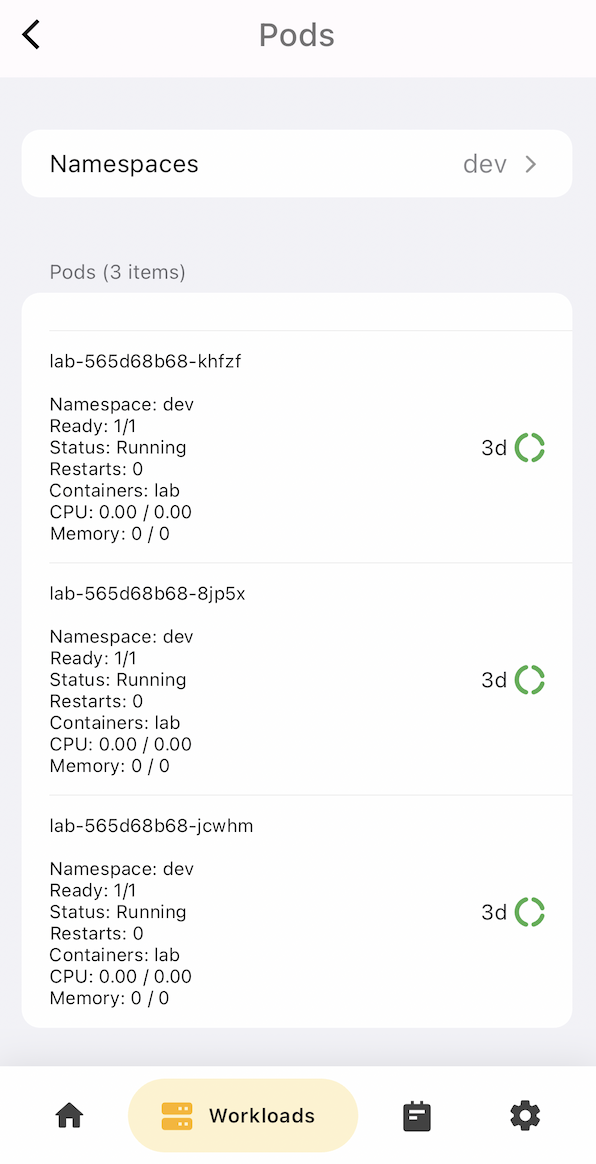
Pod list
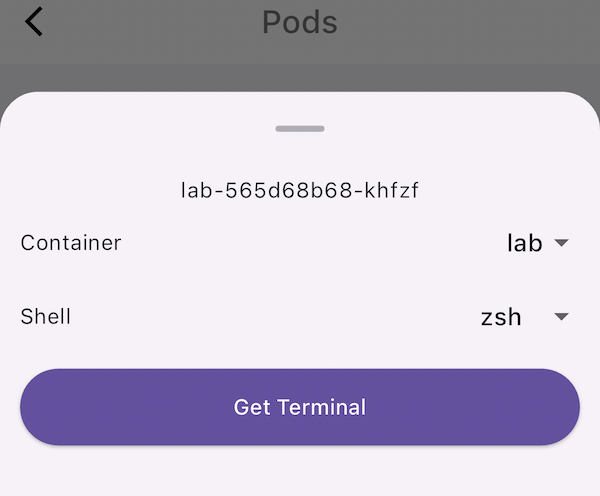
Pod terminal
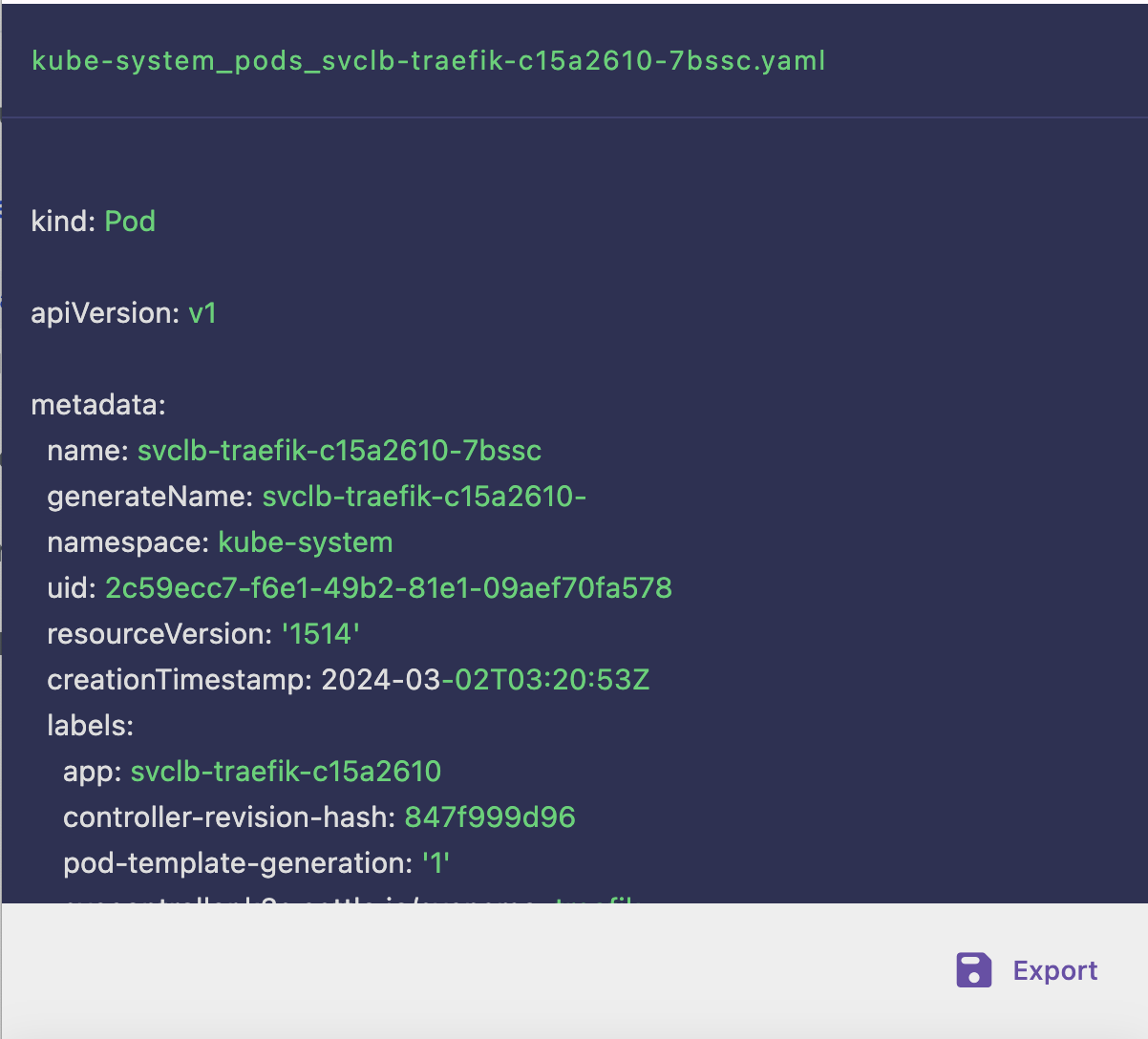
YAML export
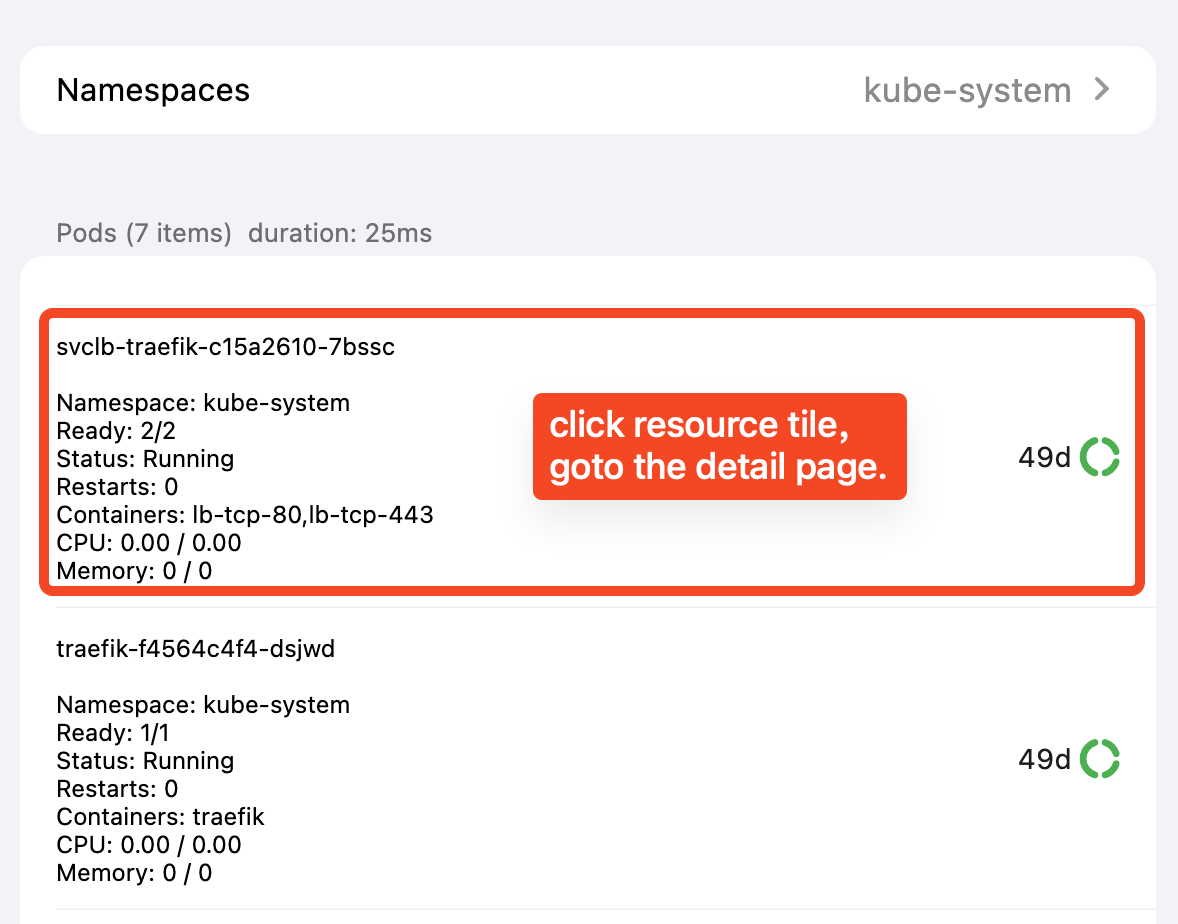
Resource details
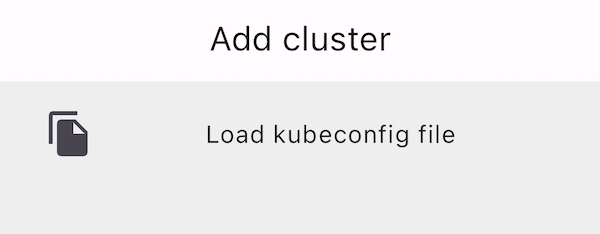
Add cluster
## Recent updates
2024-05-26
### v1.5.0
Iterative upgrade and bug fixes: edit kubeconfig, namespace and endpoint details.
[Full changelog →
](/docs/k8z/changelog)
2024-05-12
### v1.3.0
Actions for details page, logs & terminal modals, pull-to-refresh across lists.
[Full changelog →
](/docs/k8z/changelog)
2024-04-19
### v1.1.0
Slide-pane delete, action buttons, detail pages for workloads and storage.
[Full changelog →
](/docs/k8z/changelog)
## Get Started with k8z
Download today and manage your Kubernetes clusters from anywhere.
[](https://apps.apple.com/app/k8z/id6739574445)[macOS (GitHub)
](https://github.com/k8zdev/k8z/releases)
[View on GitHub
](https://github.com/k8zdev/k8z)
[Documentation →
](/docs/k8z/)
---
url: /docs/cfdash/analytics.md
---
# Analytics
The **Monitor** tab gives you visibility into your Cloudflare traffic and security.
## Open Analytics
1. Open the **Monitor** tab.
2. Stay on the **Analytics** sub-tab (or switch to it).
3. Use the zone dropdown to select which domain you're looking at.
## Traffic Charts
CF Dash shows interactive HTTP traffic charts with:
- **Daily breakdowns** — requests over time.
- **Country-level data** — where your traffic comes from, with a breakdown by country.
Charts are gesture-friendly on iOS (tap and pinch) and support the platform's native look and feel.
> **Analytics range**: Free users see the last **24 hours**. Pro users see the last **30 days** (and 7-day views).
## Attack Surface Report
The **Security** sub-tab includes the Cloudflare **Attack Surface Report** — an overview of your domain's exposure and recommendations to improve your security posture.
## What's Missing vs the Web Dashboard
The Monitor tab is focused on the essentials: traffic, security summary, and WAF events. For deep-dive analytics like DNS queries or bandwidth by datacenter, refer to the Cloudflare web dashboard.
---
url: /docs/cfdash/cache.md
---
# Cache
CF Dash gives you quick control over your Cloudflare cache from the **Domains → Cache** page.
## Open Cache
1. Go to the **Domains** tab and tap your domain.
2. Tap **Cache**.
## Purge Everything
Tap **Purge All** to clear the entire cache for the zone. Cloudflare will fetch fresh content from your origin on the next request.
> Purging everything can temporarily increase origin load. Use it when you need to invalidate a wide change.
## Purge by URL
To clear only specific files:
1. Tap **Purge by URL**.
2. Enter the URL (or URLs) to purge, for example `https://example.com/images/logo.png`.
3. Confirm to purge just those URLs.
This is the most efficient way to invalidate changed assets without affecting the rest of the cache.
## Development Mode
**Development Mode** temporarily bypasses Cloudflare's cache and serves files directly from your origin. This is useful while you're making changes to your site and want to see them immediately.
Toggle Development Mode on while working, then remember to turn it off — leaving it on bypasses the performance benefits of caching.
## Cache Settings
The cache page also shows your zone's cache-related settings so you can review the current configuration at a glance.
---
url: /docs/cfdash/d1-databases.md
---
# D1 Databases
CF Dash lets you manage Cloudflare D1 (serverless SQL) databases from the **Compute** tab.
## Open D1
1. Open the **Compute** tab.
2. Switch to the **D1** sub-tab to see your databases.
## Database Details
Tap a database to open its detail page, which shows:
- The database name and ID
- **Queries** and analytics (requests, latency)
- **Time-Travel** — browse and restore database backups by timestamp.
## Run a Query
1. Open a database and tap the **Query** action.
2. Write your SQL in the console and run it.
3. See the results inline.
## Import SQL
You can import a `.sql` dump to load data into a database:
1. On the database detail page, tap **Import**.
2. Provide the SQL file URL.
3. CF Dash downloads the dump and imports it into the database.
> Managing D1 databases (query, import, time-travel) is a **Pro** feature.
## Time-Travel Backups
D1 automatically keeps backups. In the database detail page you can:
- View available backup points and their timestamps.
- Restore the database to a chosen point in time.
Use this to recover from accidental destructive queries.
---
url: /docs/cfdash/dns-records.md
---
# DNS Records
The DNS editor in CF Dash gives you full control over your Cloudflare DNS records from your phone or Mac.
## Open DNS Management
1. Go to the **Domains** tab and tap your domain.
2. Tap **DNS Management**.
## Supported Record Types
CF Dash supports all common record types:
| Type | Name | Notes |
| ----- | --------------------- | --------------------------- |
| A | IPv4 Address | Can be proxied |
| AAAA | IPv6 Address | Can be proxied |
| CNAME | Canonical Name | Can be proxied |
| MX | Mail Exchange | Requires priority |
| TXT | Text Record | e.g. verification strings |
| SRV | Service Record | Requires priority |
| NS | Name Server | |
| CAA | CAA Record | Certificate authority rules |
| PTR | Pointer Record | |
| SOA | Start of Authority | |
| HTTPS | HTTPS Service Binding | |
| SVCB | Service Binding | |
## Add a Record
1. Tap **Add Record**.
2. Choose the record **Type**.
3. Enter the **Name** (for example `www`) and the **Content** (the value of the record).
4. Set the **TTL** — `Auto` (default) or a specific value in seconds.
5. For proxiable types, toggle **Proxy** to route traffic through Cloudflare (the orange cloud).
6. Save the record.
> **Tip**: Proxying hides your origin IP and enables Cloudflare's performance and security features. Use it for web-facing records like A, AAAA, and CNAME.
## Edit a Record
Tap an existing record to edit its name, content, TTL, or proxy state. Changes apply immediately.
## Delete a Record
Swipe (or tap the delete action) on a record to remove it. Deleting a DNS record takes effect immediately — make sure you know what you're removing.
## Priority Fields
Records that require a **priority** (MX and SRV) show an additional priority input. Lower numbers are preferred (for example `10` before `20`).
---
url: /docs/cfdash/domains.md
---
# Domains
The **Domains** tab is the home screen of CF Dash. It lists all the zones in your Cloudflare account with their status and SSL health, so you can monitor your domains at a glance.
## View Your Domains
When you open the app, your zones are shown in a list. Each row shows:
- The domain name
- Status (active, pending, etc.)
- SSL certificate status
Tap a domain to open its detail page.
## Domain Details
The detail page shows key dates and information:
- **Created** — when the zone was added
- **Activated** — when the zone became active
- **Modified** — last change
- **Expires** — domain expiry (if available)
- **Status** — active or paused
- **Type** — full or partial setup
From the detail page you can:
| Action | What it does |
| ------------------ | ------------------------------------------------------ |
| **DNS Management** | Open the DNS record editor |
| **SSL/TLS** | Configure SSL mode and certificates |
| **Cache** | Purge cache and toggle development mode |
| **Pause / Resume** | Pause Cloudflare proxying for the domain, or resume it |
| **Delete** | Remove the zone from your Cloudflare account |
## Add a Domain
1. Tap the **+** button on the Domains tab.
2. Enter your domain name.
3. CF Dash adds the zone. Add the required DNS records (usually the nameservers or an A record) to complete the setup.
> Free users can add up to **2 domains**. Pro unlocks unlimited domains.
## Remove a Domain
Open the domain detail page and tap **Delete**. This removes the zone from your Cloudflare account — it does not affect your actual domain registration or DNS hosting provider.
## Pause / Resume
You can temporarily **pause** Cloudflare's proxy for a domain (for example while moving servers) and **resume** it later. Pausing stops Cloudflare from proxying traffic through its network for that zone.
---
url: /docs/cfdash/free-vs-pro.md
---
# Free vs Pro
CF Dash is free to download and use. The free tier includes the core daily workflow; Pro unlocks advanced tools for power users.
## Free Tier
Everything you need to manage your domains day-to-day, with no payment:
| Feature | Free |
| ------------ | ------------------------------------------------------ |
| Domains | Up to **2** |
| Accounts | **1** account |
| DNS records | ✅ Full CRUD (A, AAAA, CNAME, MX, TXT, SRV, NS, CAA, …) |
| Proxy toggle | ✅ One-tap orange cloud |
| SSL/TLS | ✅ Mode selector + Universal SSL |
| Cache | ✅ Purge all / by URL, development mode |
| Analytics | ✅ Last **24 hours** |
| Biometric | ✅ Face ID / Touch ID |
## Pro Subscription
Pro is for users who want advanced tooling across multiple accounts and edge compute:
| Feature | Free | Pro |
| ---------------- | --------- | ------------------------------------------------------------ |
| Domains | 2 | **Unlimited** |
| Accounts | 1 | **Multiple** |
| Analytics | 24h | **7d / 30d** |
| WAF events | — | ✅ Filterable monitoring |
| Workers & Pages | Read-only | ✅ **Manage** (create, versions, schedules, routes, env vars) |
| R2 buckets | — | ✅ **Manage** (create, lifecycle, CORS) |
| D1 databases | — | ✅ **Manage** (query, import, time-travel) |
| KV namespaces | Read-only | ✅ **Manage** (write, bulk, rename) |
| SSL custom certs | — | ✅ Upload custom certificates |
## How to Upgrade
Go to **Settings → Pro** and follow the App Store purchase flow. Pro unlocks instantly; use **Restore** if you switch devices.
## Which Is Right for You?
- **Most people**: the free tier covers domain monitoring, DNS, SSL, cache, and 24h analytics — more than enough for a few personal domains.
- **Power users / agencies**: if you manage multiple accounts, many domains, edge compute (Workers, R2, D1, KV), or need long-range analytics and WAF monitoring, Pro is worth it.
---
url: /docs/cfdash/index.md
---
# CF Dash Documentation
CF Dash is a native iOS (iPhone/iPad) and macOS app that brings the Cloudflare dashboard to your pocket and desktop. Manage domains, DNS, Workers & Pages, R2, D1, KV, analytics, WAF, and cache — all from a native app with biometric security.
## Getting Started
| Guide | Description |
| -------------------------------------------- | ----------------------------------------------------------- |
| [Installation](/docs/cfdash/installation.md) | Download CF Dash from the App Store on iPhone, iPad, or Mac |
| [Sign In](/docs/cfdash/sign-in.md) | Connect your Cloudflare account with OAuth or an API Token |
| [Quick Start](/docs/cfdash/quick-start.md) | Add your first domain and explore the main tabs in minutes |
## Domain Management
| Guide | Description |
| ------------------------------------------ | ------------------------------------------------------------------- |
| [Domains](/docs/cfdash/domains.md) | View zones, status and SSL health; add, pause, and remove domains |
| [DNS Records](/docs/cfdash/dns-records.md) | Full CRUD for A, AAAA, CNAME, MX, TXT, and more, with one-tap proxy |
| [SSL/TLS](/docs/cfdash/ssl-tls.md) | Configure SSL mode, order Universal SSL, upload custom certificates |
| [Cache](/docs/cfdash/cache.md) | Purge cache by URL or everything; toggle development mode |
## Compute
| Guide | Description |
| ------------------------------------------------ | ------------------------------------------------------------------- |
| [Workers & Pages](/docs/cfdash/workers-pages.md) | Manage Workers scripts and Pages projects, deployments, and domains |
| [R2 Storage](/docs/cfdash/r2-storage.md) | Create buckets, manage objects and lifecycle rules |
| [D1 Databases](/docs/cfdash/d1-databases.md) | Browse databases, run queries, import SQL, and time-travel backups |
| [KV Namespaces](/docs/cfdash/kv-namespaces.md) | Manage namespaces and keys, bulk write and delete |
## Monitoring & Security
| Guide | Description |
| ---------------------------------------- | ------------------------------------------------ |
| [Analytics](/docs/cfdash/analytics.md) | Traffic charts with daily and country breakdowns |
| [WAF Events](/docs/cfdash/waf-events.md) | Filter and review firewall events |
## Settings
| Guide | Description |
| ----------------------------------------------- | ------------------------------------------------------------------ |
| [Settings & Accounts](/docs/cfdash/settings.md) | Manage accounts, Pro subscription, theme, language, and biometrics |
| [Free vs Pro](/docs/cfdash/free-vs-pro.md) | What's included in the free tier and in the Pro subscription |
***
## Platform Support
- **iOS**: iPhone and iPad (iOS 15+)
- **macOS**: Mac with Apple Silicon or Intel
CF Dash stores your credentials with the platform's secure storage (Keychain / Secure Enclave) and never sends your token anywhere except the official Cloudflare API.
---
url: /docs/cfdash/installation.md
---
# Installation
CF Dash is available on the Apple App Store for iPhone, iPad, and macOS.
## Download
- **iPhone / iPad**: [CF Dash on the App Store](https://apps.apple.com/app/cfdash/id6740367143)
- **macOS**: [CF Dash on the Mac App Store](https://apps.apple.com/app/cfdash/id6740367143)
## Requirements
| Platform | Minimum OS |
| -------- | ---------- |
| iPhone | iOS 15+ |
| iPad | iPadOS 15+ |
| Mac | macOS 13+ |
- A Cloudflare account (free or paid) — [create one](https://dash.cloudflare.com) if you don't have it.
- Internet access to reach the Cloudflare API.
## What's Next
After installing, [sign in](/docs/cfdash/sign-in.md) with your Cloudflare account and [add your first domain](/docs/cfdash/quick-start.md).
---
url: /docs/cfdash/kv-namespaces.md
---
# KV Namespaces
CF Dash lets you manage Cloudflare Workers KV (key-value storage) from the **Compute** tab.
## Open KV
1. Open the **Compute** tab.
2. Switch to the **KV** sub-tab to see your namespaces.
## Namespace Details
Tap a namespace to open its detail page, which shows:
- The namespace title and ID
- **Analytics** — operations and storage usage
- A list of the keys stored in the namespace
From here you can:
| Action | Description |
| -------------------- | ------------------------------------------------- |
| **View a key** | Tap a key to see its value, edit it, or delete it |
| **Rename namespace** | Change the namespace title |
| **Delete namespace** | Remove the namespace and all its keys |
## Manage Keys
- **Create / edit** — add a new key-value pair or update an existing key's value.
- **Bulk write** — upload multiple key-value pairs at once.
- **Bulk delete** — remove multiple keys at once.
> Managing KV namespaces (writes, bulk operations, rename) is a **Pro** feature. Free users can browse read-only.
---
url: /docs/cfdash/quick-start.md
---
# Quick Start
Get up and running with CF Dash in a few minutes.
## 1. Sign In
Open CF Dash and sign in — [tap Continue with Cloudflare or paste an API Token](/docs/cfdash/sign-in.md). After a successful sign-in you land on the **Domains** tab.
## 2. Add a Domain
1. On the **Domains** tab, tap the add button.
2. Enter your domain name (for example `example.com`).
3. CF Dash adds the zone to your Cloudflare account and it appears in your zone list with its status and SSL health.
> Free users can add up to **2 domains**. Pro unlocks unlimited domains.
## 3. Make a DNS Change
1. Tap your domain to open its details.
2. Tap **DNS Management**.
3. Tap **Add Record** to create a new record (A, AAAA, CNAME, MX, TXT, and more), or tap an existing record to edit it.
4. Toggle **Proxy** to turn the orange cloud on or off for the record.
## 4. Explore the Tabs
| Tab | What you can do |
| ------------ | ------------------------------------------ |
| **Domains** | Zones, DNS, SSL/TLS, cache |
| **Compute** | Workers & Pages, R2, D1, KV |
| **Monitor** | Analytics, security, WAF events |
| **Settings** | Accounts, Pro, theme, language, biometrics |
## 5. Lock It Down (Optional)
Enable **Face ID / Touch ID** in **Settings → Data & Security** so the app requires biometric authentication to open.
---
url: /docs/cfdash/r2-storage.md
---
# R2 Storage
CF Dash lets you manage Cloudflare R2 object storage buckets from the **Compute** tab.
## Open R2
1. Open the **Compute** tab.
2. Switch to the **R2** sub-tab to see your buckets.
## Create a Bucket
1. On the R2 sub-tab, tap **+** (create bucket).
2. Enter a bucket name.
3. CF Dash creates the bucket in your account.
> Creating and managing R2 buckets is a **Pro** feature.
## Bucket Details
Tap a bucket to open its detail page, which shows:
- **Objects** — browse the contents of the bucket.
- **Lifecycle Rules** — configure automatic lifecycle rules (for example, expire objects after N days).
- **CORS** — view and manage Cross-Origin Resource Sharing settings.
- **Analytics** — request and storage usage for the bucket.
## Delete a Bucket
Open the bucket and choose **Delete**. Removing a bucket permanently deletes its contents — Cloudflare does not recover deleted R2 data.
---
url: /docs/cfdash/settings.md
---
# Settings & Accounts
The **Settings** tab is where you manage your accounts, subscription, and app preferences.
## Account
Open **Settings → Account** to see:
- **Current account** — the account you're signed in as, its display name, and credential type.
- **Token info** — the credential type and token status.
- **Accounts** — all the Cloudflare accounts you've added; switch between them instantly.
Use **Sign out** to remove the current account's local credential. Your Cloudflare data is not affected.
## Pro Subscription
- **Manage / upgrade** — view the Pro subscription and upgrade from the App Store.
- **Restore** — restore a previously purchased Pro subscription.
- **Status** — check whether Pro is active.
## Appearance
- **Theme** — System / Light / Dark, with a live preview.
- **Language** — English / 简体中文.
## Data & Security
- **Biometric** — enable Face ID / Touch ID so the app requires biometric authentication to open (available on supported devices).
- **Clear Cache** — clear locally cached data.
- **Certificate Reminder** — get a notification when a zone's SSL certificate is close to expiring.
## About
- **About** — app version and information.
- **Debug menu** — developer diagnostics and logs (Talker), useful when reporting issues.
## Cert Expiry Reminder
If you enable **Certificate Reminder**, CF Dash will notify you before a certificate expires so you can renew it in time.
---
url: /docs/cfdash/sign-in.md
---
# Sign In
CF Dash connects to Cloudflare using either official OAuth or an API credential. Your credential is stored securely in the platform keychain and never leaves your device except to the official Cloudflare API.
## Sign in with Cloudflare (OAuth) — Recommended
1. Open CF Dash and tap **Continue with Cloudflare**.
2. You'll be taken to the Cloudflare authorization page in your browser.
3. Review the requested permissions and approve.
4. You're signed back in automatically — no token to create, copy, or paste.
OAuth is the recommended way to sign in. It uses Cloudflare's official OAuth 2.0 with PKCE, scoped to the permissions you approve.
## Sign in with an API Token
If you prefer to use a scoped API Token:
1. Create an API Token in the Cloudflare dashboard (My Profile → API Tokens → Create Token), with the permissions you need (for example Zone:Edit and DNS:Edit for domain management).
2. Open CF Dash and paste the token into the token field.
3. CF Dash auto-detects the token type:
- **User API Token** — scoped to your user and permissions.
- **Account API Token** (starts with `cfat_`) — scoped to an account.
- **Global API Key** (starts with `cfk_`, or a 37–45 character hex string) — full account access; an email address is required.
> Use a scoped **API Token** rather than the Global API Key when possible. The Global API Key grants full access to your account.
## Multi-Account
You can add more than one Cloudflare account and switch between them instantly from **Settings → Account**, without re-entering credentials.
- Free users can add **1 account**.
- Pro users can add **unlimited accounts**.
## Sign Out
To remove the current account, go to **Settings → Account** and sign out. Your Cloudflare data is not affected — only the local credential is removed.
---
url: /docs/cfdash/ssl-tls.md
---
# SSL/TLS
CF Dash lets you manage SSL/TLS for each of your Cloudflare zones.
## Open SSL/TLS
1. Go to the **Domains** tab and tap your domain.
2. Tap **SSL/TLS**.
## SSL Mode
Choose the SSL mode that fits your setup:
- **Off** — no encryption
- **Flexible** — encryption between visitor and Cloudflare only
- **Full** — encryption between visitor and Cloudflare, and Cloudflare to your origin (origin must have a valid certificate)
- **Full (strict)** — like Full, but the origin certificate must be valid for the hostname
Most setups use **Full (strict)** or **Full**.
## Universal SSL
Cloudflare automatically issues a free Universal SSL certificate for your zone. You can:
- **Order Universal SSL** — request a new Universal SSL certificate (covers the apex and common subdomains).
- **Wildcard cover** — check whether the certificate covers `*.yourdomain.com`.
## Custom Certificates
If you bring your own certificate (for example an Extended Validation certificate), you can:
- **Upload Custom** — provide the certificate and private key. CF Dash uploads it to Cloudflare for the zone.
- **Remove** — delete a previously uploaded custom certificate.
> **Note**: Universal SSL and custom certificate management are Pro features.
## Certificate Status
The SSL page shows your current certificate status so you can confirm your zone is properly secured and spot expiring certificates before they cause downtime.
---
url: /docs/cfdash/waf-events.md
---
# WAF Events
CF Dash lets you monitor Cloudflare's Web Application Firewall (WAF) events in real time from the **Monitor** tab.
## Open WAF Events
1. Open the **Monitor** tab.
2. Switch to the **WAF** sub-tab.
3. Use the zone dropdown to select the domain you want to inspect.
## Event List
The WAF events list shows firewall events with their action and source, so you can see what's being blocked, challenged, or allowed.
## Filtering
Use the filter bar to narrow the list:
- **Action** — filter by the firewall action (for example Block, Challenge, Managed Challenge, Allow).
- **Source** — filter by the source of the traffic.
Filters apply immediately and the list reloads with matching events. You can also:
- **Refresh** — reload the events with the current filters.
- **Load more** — paginate through older events.
> WAF event monitoring with filtering is a **Pro** feature.
## Common Use Cases
- **Investigate an attack** — filter by `Block` and a suspicious source to see what's being blocked.
- **Check a rule change** — after editing a WAF rule, filter by action to confirm the intended behavior.
---
url: /docs/cfdash/workers-pages.md
---
# Workers & Pages
The **Compute** tab is where you manage your edge compute — Cloudflare Workers and Pages projects — alongside R2, D1, and KV.
## Workers & Pages Overview
Open the **Compute** tab and stay on the **Workers & Pages** sub-tab. You'll see a unified list of your Workers scripts and Pages projects.
### Create
Tap **+** to create a new Worker or Pages project, then enter a name. The new resource appears in your account.
### Worker Details
Tap a Worker to open its detail page, then:
- **Versions** — view all versions of the Worker script and roll back to a previous version.
- **Schedules** — add, edit, and delete **cron triggers** so the Worker runs on a schedule.
- **Routes** — add and edit routes that map URLs to the Worker.
- **Environment Variables** — add and remove environment variables (including secrets).
- **Delete** — remove the Worker from your account.
### Pages Project Details
Tap a Pages project to open its detail page, then:
- **Deployments** — browse the list of deployments; open one to see its status, stages, logs, and actions.
- **Rollback** — revert a deployment to a previous version.
- **Retry** — retry a failed deployment.
- **Delete** — remove a deployment.
- **Custom Domains** — add and remove custom domains attached to the Pages project.
- **Delete** — remove the Pages project.
> **Note**: Managing Workers and Pages (creating, editing bindings, deployments) is a **Pro** feature. Free users can browse read-only.
## Bindings
From a Worker detail page you can manage bindings for KV, R2, D1, and Durable Objects, connecting your Worker to your storage resources.
---
url: /docs/index.md
---
# Documentation
Welcome to the k8z.dev documentation.
## Products
- [k8z Documentation](/docs/k8z/index.md) — Kubernetes multi-cluster management
- [CF Dash Documentation](/docs/cfdash/index.md) — Cloudflare Dashboard iOS & macOS client
- [AI-friendly Docs Index](/llms/index.md) — Structured documentation for AI agents
## Legal
- [Privacy Policy](/docs/privacy/index.md) — How we handle your data
---
url: /docs/k8z/changelog.md
---
# Changelog

## v1.5.0
 | 
1. Iterative upgrade and bug fix:
1. Fix edit kubeconfig no effect.
2. Add namespace, service, service accounts, endpoints subset detail.
## v1.4.0
 | 
1. Bug fix:
1. Fix: DaemonSets should not have scale action.
## v1.3.0
 | 
1. Add more Actions type for details page: logs and terminal, show creation time on the detail page.
2. Add logs, terminal action button to pod detail to show logs and terminal modal.
3. Implement modal widget to confirm delete resource, and real delete resource when confirmed.
4. Add container ID and image ID to pod sections.
5. Implement delete pod feature for pods list slidable pane.
6. Implement pull down to refresh deployments list, network resources list, DaemonSets, StatefulSets, Pods, applications, config and storage resources list.
## v1.2.0
1. Iterative upgrade resource details page:
1. Add resourceVersion, selfLink, uid, finalizers tiles.
2. Hidden labels, annotations tiles on detail page if null.
3. Implement rendering of data in ConfigMap, highlights data content, and adds the function of copying to clipboard.
4. Implement Secret data item tiles, decode and display base64 format, and support copying field keys, encrypted data and decoded data to the clipboard.
5. Implement Pod spec tiles, including: init container, container, DNS policy, host network, host name, image pull secret.
6. Displays a list of image pull secret names in a modal.
7. Use a modal box to display the image pulling strategy, image, command, parameter, environment variable, port, readiness probe, startup probe, and survival probe of the Pod spec initial container and each container in the container.
2. Bug fixes and improvements:
1. When automatically matching the system language, the language code cannot be obtained correctly.
2. Refactor the current cluster provider.
## v1.1.0
 | 
1. Fix: timeout config not persisted on save.
2. Fix: current cluster is null will panic.
3. Add: slide pane to delete cluster.
4. Add: action buttons to resource detail page, include scale replicas of workload sets and route to YAML info page to export resource.
5. Add: details page for Helm releases, endpoints, ingresses, services, ConfigMaps, Secrets, ServiceAccounts, CRDs, namespaces, nodes, PVCs, PVs, storage class, DaemonSets, Deployments, Pods, StatefulSets.
## v1.0.1
 | 
1. Fix section's title of ServiceAccount page.
2. Add request duration for namespace select widget and resource pages.
## v1.0.0

1. Implement add clusters from kubeconfig file.
2. Show CPU/memory etc metrics of current cluster at home page.
3. Implement resource list pages:
- Nodes
- Events
- Namespaces
- CRDs
- ConfigMaps
- Secrets
- ServiceAccounts
- StorageClass
- Persistent Volumes (PVs)
- Persistent Volume Claims (PVCs)
4. Implement workload list pages:
- Pods
- DaemonSets
- Deployments
- StatefulSets
- Endpoints
- Ingresses
- Services
---
url: /docs/k8z/configuration.md
---
# Configuration
k8z stores cluster configurations securely on your device.
## Cluster Settings
Each imported cluster stores:
- **API Server URL** — the cluster endpoint
- **Authentication** — token or certificate-based auth from your kubeconfig
- **Display Name** — a friendly label for each cluster
## App Settings
- **Theme**: Light / Dark / System (follows your device appearance)
- **Language**: English / Chinese (localized UI)
## Data Persistence
- Cluster information is stored locally on your device
- No data leaves your device without your explicit action
- kubeconfig contents are not sent to any external server
---
url: /docs/k8z/contexts.md
---
# Cluster Management
Manage multiple Kubernetes clusters from within the app.
## Add a Cluster
1. Open k8z and navigate to the clusters screen
2. Tap **Add Cluster**
3. Import your kubeconfig file or enter connection details manually
4. The cluster appears in your cluster list, ready to use
## Switch Between Clusters
Tap any cluster in the list to connect. The app switches instantly — no command-line context juggling required.
## Cluster Overview
Each connected cluster shows:
- Kubernetes version and status
- CPU and memory usage charts
- Recent warning events
- Resource counts (nodes, pods, namespaces)
## Remove a Cluster
Swipe to delete a cluster from your local storage. Your cluster is not affected — only the local configuration is removed.
---
url: /docs/k8z/faqs.md
---
# FAQs
### 0x00: Origin of name
**Question**: Why is it named k8z?
**Answer**: The name `k8z` is inspired by `healthz`/`livez`/`readyz` etc. `k8z` is short for `kubernetez` — shorter and easier to remember.
> It historically comes from Google's internal practices. They're called "z-pages".
>
> The reason it ends with `z` is to reduce collisions with actual application endpoints with the same name (like `/status`). See this talk for more: [https://vimeo.com/173610242](https://vimeo.com/173610242)
>
> Similar endpoints (at least inside Google) are `/varz`, `/statusz`, `/rpcz`. Services developed at Google automatically get these endpoints to export their health and metrics and there are tools that collect the exposed metrics/statuses from all the deployed services.
>
> Open source tools like Prometheus implement this pattern (since original authors of Prometheus are also ex-Googlers) by coming to a well-known endpoint to collect metrics from your application. Similarly OpenCensus allows you to expose z-pages from your app (ideally on a different port) to diagnose problems.
### 0x01: About credentials safety
**Question**: How do you keep my Kubernetes cluster access credentials (kubeconfig) secure?
**Answer**: Our application is open source, inviting everyone to examine its inner workings, including its handling of API credentials. This transparency ensures that there are no hidden functions that compromise security. You can get the source code from our GitHub repository: [k8z source code on GitHub](https://github.com/k8zdev/k8z).
---
url: /docs/k8z/features/details_page.md
---
# Details page
We can see the labels, annotations and other detailed information of the resource on the details page, as well as the operation buttons for different resources.
We can view detailed information on `helm` releases, `endpoints`, `ingresses`, `services`, `configmaps`, `secrets`, `service accounts`, `crds`, `namespaces`, `nodes`, `pvcs`, `pvs`, `storage class`, `daemon sets`, `deployments`, `pods`, `stateful sets`.
### How to view details?
First, locate the resource list you want to view. For example, if we want to view the detailed information of a pod, click `Workloads` ➡️ `Pods`, and then click on the specific resource in the list to enter the details page.

### Resource YAML and export
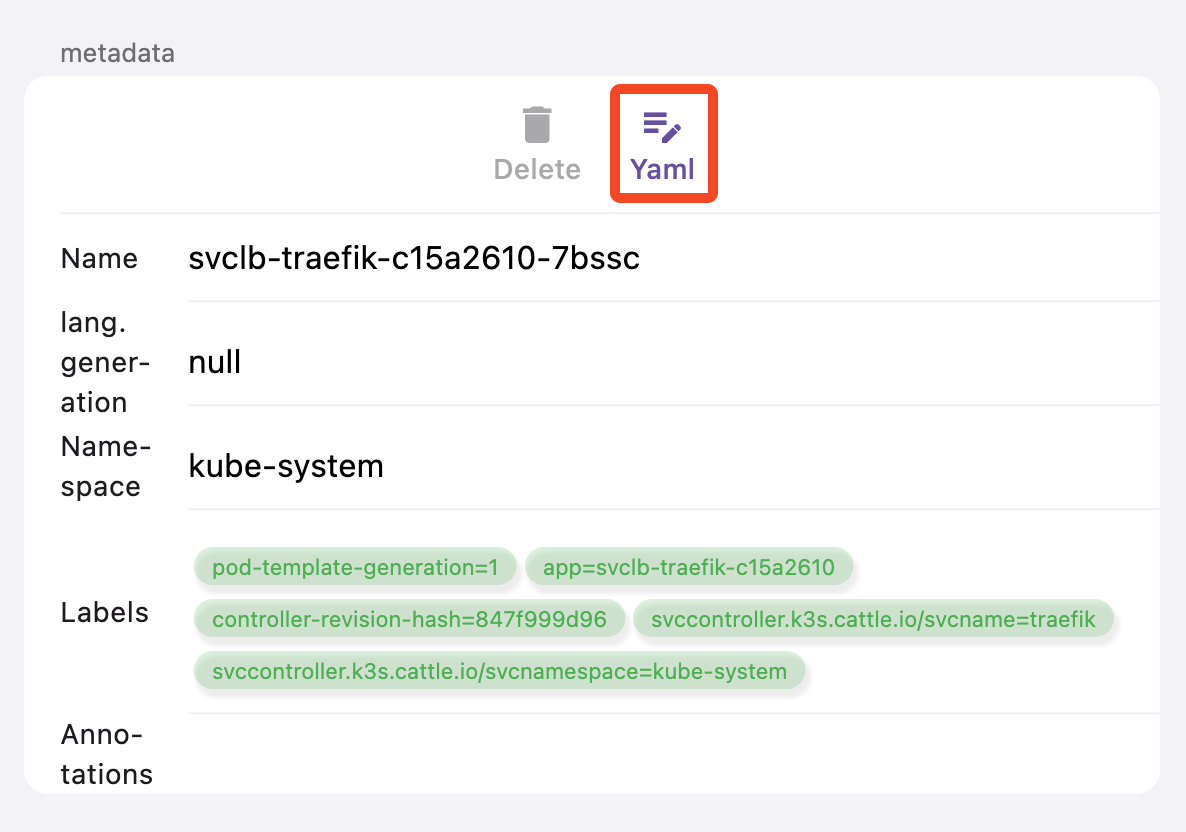
Clicking the "Yaml" button in the "Metadata" section of the details page will route us to the YAML content page. The picture below is an example of pod **svclb-traefik-c15a2610-7bssc**.

Click the `export` button in the lower right corner of the YAML content page to export YAML to a file. The export file is named **$namespace$resourceType$resourceName.yaml**. For example, the file name of the pod exported YAML above is **kube-system\_pods\_svclb-traefik-c15a2610-7bssc.yaml**.
- The storage path of the exported file on macOS is **$HOME/Library/Containers/dev.k8z.app/Data/Documents/exported/**.
- Export files on mobile and iPad can be found in the `k8z` folder of `Files` ➡️ `My iPhone`.
---
url: /docs/k8z/features/index.md
---
# Features
This section covers k8z app features in detail.
- [Details page](/docs/k8z/features/details_page.md) — Resource details, YAML export, and metadata
- [Pod list](/docs/k8z/features/pod_list.md) — Pod list view, terminal, and logs streaming
---
url: /docs/k8z/features/pod_list.md
---
# Pod list
## Introduction
To view the pod list, click `Workloads` at the bottom navigator, then click `Pods` tile of the `Workloads` section.

Every pod item displays `name`, `Namespace`, `Ready` status, `Running` status, `Restarts` count number, `Containers` in the pod, `CPU` resource requests and limits, `Memory` resource requests and limits.
Drag a pod item and slide to show the actions pane.
## Container terminal
Drag and slide to the right to see the `Terminal` action button.
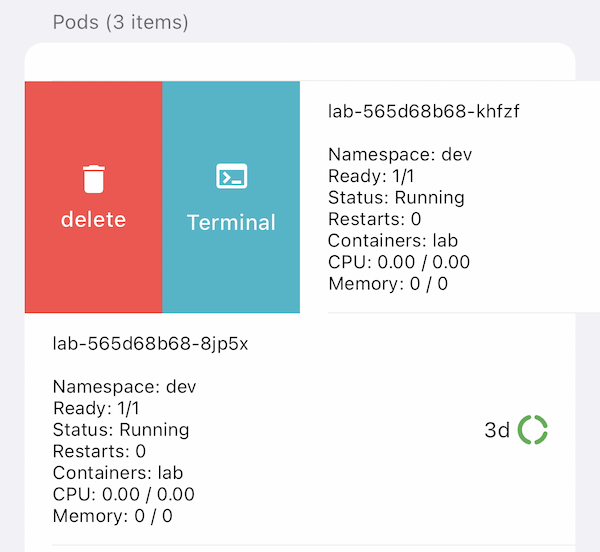
Click the `Terminal` button to open a bottom modal dialog. Select a `Container` in the pod, and select the `Shell` of the container, then click `Get Terminal` to open the terminal.

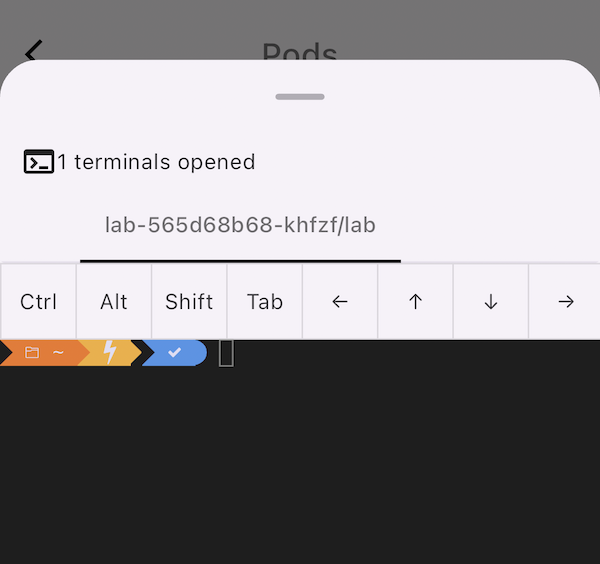
You will get a bottom modal dialog with an opened terminal. Input your command to operate. In the terminal top, we offer a virtual keyboard with many useful keys that the iOS keyboard does not support: `Ctrl`, `Alt`, `Shift`, `Tab`, `Arrow Left`, `Arrow Up`, `Arrow Down`, `Arrow Right`.
## Container logs stream
Drag and slide to the left to see the `Logs` action button.
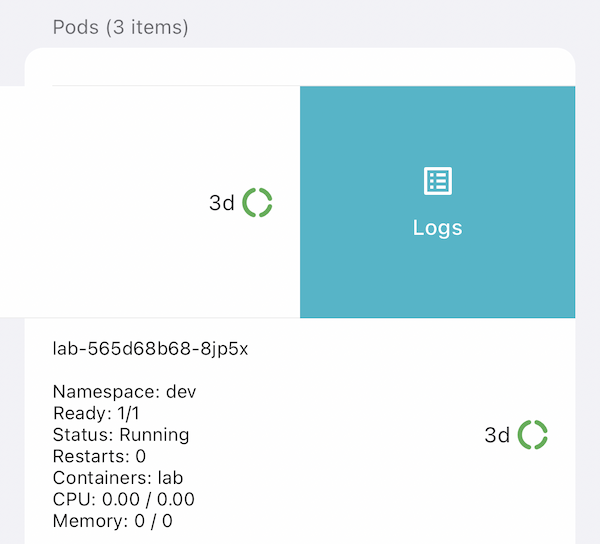
Click the `Logs` button to open a bottom modal dialog. Select a `Container` in the pod, and select the `Since` time of logs, then click `Get Terminal` to open the logs stream terminal.
---
url: /docs/k8z/index.md
---
# k8z Documentation
Kubernetes admin app for iOS, iPad, and macOS — manage your clusters from your mobile device or desktop.
## Getting Started
Learn how to install k8z from the App Store and connect to your clusters.
## Guides
Step-by-step guides for managing Kubernetes resources with k8z.
## Reference
Configuration options and resource management reference.
---
url: /docs/k8z/installation.md
---
# Installation
k8z is available on the Apple App Store for iPhone, iPad, and macOS.
## Download
- **iPhone**: [App Store](https://apps.apple.com/us/app/k8z/id6478047741?platform=iphone)
- **iPad**: [App Store](https://apps.apple.com/us/app/k8z/id6478047741?platform=ipad)
- **macOS (Apple Silicon)**: Download from [GitHub Releases](https://github.com/k8zdev/k8z/releases)
## Requirements
- iOS 16+ / iPadOS 16+ / macOS 13+
- A Kubernetes cluster with API server accessible from your device
- Your kubeconfig file ready to import
---
url: /docs/k8z/namespaces.md
---
# Namespace Management
Browse and switch between Kubernetes namespaces from the app UI.
## Browse Namespaces
Navigate to the **Namespaces** page from the resource list. All namespaces in your cluster are displayed with their status.
## Switch Namespace
Tap a namespace to select it. Resources throughout the app (pods, services, deployments, etc.) automatically filter to show only items in the selected namespace.
## Namespace Details
Tap any namespace to view its details, including:
- Resource quotas (if configured)
- Current resource usage
- Labels and annotations
---
url: /docs/k8z/quick-start.md
---
# Quick Start
Get started with k8z in minutes.
## 1. Install the App
Download k8z from the App Store on your iPhone or iPad.
## 2. Import Your Kubeconfig
Open the app and import your Kubernetes cluster kubeconfig file. You can:
- Copy the kubeconfig content and paste it into the app
- Transfer the file via AirDrop or file sharing
- Enter cluster API server URL and token manually
## 3. Explore Your Cluster
Once connected, you can:
- View the **cluster overview** with real-time metric charts
- Browse **nodes, pods, deployments, services**, and more
- Read **cluster events** to monitor activity
- Navigate between **namespaces** with a single tap
## 4. Switch Between Clusters
Manage multiple clusters by importing multiple kubeconfig files. Switch between them instantly from the cluster list.
---
url: /docs/k8z/resources.md
---
# Resource Management
Browse and manage Kubernetes resources from the app's resource pages.
## Supported Resources
k8z provides dedicated pages for browsing the following resource types:
**Workloads:**
- Pods
- Deployments
- StatefulSets
- DaemonSets
- Services
**Configuration:**
- ConfigMaps
- Secrets
**Cluster:**
- Nodes
- Namespaces
- Events
- CRDs
- StorageClasses
- PersistentVolumes (PV)
- PersistentVolumeClaims (PVC)
- ServiceAccounts (SA)
## Browse Resources
Tap any resource type from the resources screen to view the list. Each list shows key information (name, status, age, namespace) in a sortable table.
## Resource Details
Tap a resource to view its full details, including:
- YAML manifest
- Events related to the resource
- Related resources (e.g., pods belonging to a deployment)
## Filtering
Resources can be filtered by namespace, status, or search term directly from the app interface.
---
url: /docs/privacy/index.md
---
# Privacy Policy
Your privacy is important to us. It is k8z.dev's policy to respect your privacy regarding any information we may collect from you across our website and apps, including [k8z.dev](https://k8z.dev), and other sites and services we own and operate.
We only ask for personal information when we truly need it to provide a service to you. We collect it by fair and lawful means, with your knowledge and consent. We also let you know why we're collecting it and how it will be used.
We only retain collected information for as long as necessary to provide you with your requested service. What data we store, we'll protect within commercially acceptable means to prevent loss and theft, as well as unauthorized access, disclosure, copying, use or modification.
We don't share any personally identifying information publicly or with third-parties, except when required to by law.
Our website and apps may link to external sites that are not operated by us. Please be aware that we have no control over the content and practices of these sites, and cannot accept responsibility or liability for their respective privacy policies.
You are free to refuse our request for your personal information, with the understanding that we may be unable to provide you with some of your desired services.
Your continued use of our website and apps will be regarded as acceptance of our practices around privacy and personal information. If you have any questions about how we handle user data and personal information, feel free to contact us via email at **[support@k8z.dev](mailto:support@k8z.dev)**.
This policy is effective as of 2024-02-23 UTC.
---
url: /index.md
---
Native iOS · iPad · macOS
# Kubernetes and Cloudflare,
in your pocket.
Practical, native tools for cloud-native developers. Manage clusters and
edge infrastructure from your iPhone, iPad, or Mac — fast, secure, offline-capable.
[Get k8z
](https://apps.apple.com/app/k8z/id6739574445)[Get CF Dash
](https://apps.apple.com/app/cfdash/id6740367143)[GitHub
](https://github.com/k8zdev)
## Our Products
Practical tools built for cloud-native developers
[⎈
### k8z
Native iOS and macOS app for Kubernetes cluster management — diagnostics, monitoring, and configuration on the go.
Learn more →
](/apps/k8z/)[☁️
### CF Dash
The Cloudflare iOS & macOS companion — manage DNS, monitor Workers, view analytics. All from your pocket.
Learn more →
](/apps/cfdash/)
---
url: /llms/index.md
---
# AI Agent Documentation Index
This page provides structured documentation for AI agents and large language models to understand and interact with k8z.dev products.
## k8z — Kubernetes Multi-Cluster Management Platform
- **Repository**: [github.com/k8zdev/k8z](https://github.com/k8zdev/k8z)
- **Documentation**: [/docs/k8z/](/docs/k8z/index.md)
- **Key Features**: Multi-cluster management, resource monitoring, deployment automation, team collaboration
## CF Dash — Cloudflare Dashboard for iOS & macOS
- **Repository**: [github.com/k8zdev/cfdash](https://github.com/k8zdev/cfdash)
- **Documentation**: [/docs/cfdash/](/docs/cfdash/index.md)
- **Platforms**: iOS (iPhone/iPad), macOS
- **Key Features**: Multi-account management, DNS management, analytics & monitoring, beautiful native UI
- **App Store**: Available on the iOS App Store
- **Tech Stack**: Flutter, Cloudflare API
## llms.txt
This site generates AI-optimized representations of all documentation content following the [llms.txt specification](https://llmstxt.org/):
- [llms.txt](/llms.txt) — concise list of every page with a one-line summary
- [llms-full.txt](/llms-full.txt) — full content of every page in one file
For the Chinese (简体中文) versions, see [zh/llms.txt](/zh/llms.txt) and [zh/llms-full.txt](/zh/llms-full.txt).
***
_Last updated: 2026-05-30_